When to Use Dictionaries with Split

Split Software is a feature management platform that supports client-side evaluation: evaluating feature flags entirely on the client-side, local to the browser or mobile device. This has a major benefit to data privacy, as no private information need be sent to the Split cloud for outsourced evaluation.
In many cases, a feature flag evaluation is simple, like matching or randomizing on the user id. In other cases, Split users want to identify which end user gets a flag by a private attribute, e.g. age or net worth. Let’s see how these scenarios look in Split SDK code.
This article uses examples in Javascript using the Split Javascript SDK. There is a .NET example at the end of the article.
Matching with Key
Split’s minimum requirement for evaluating a feature flag is a key, which is usually a user id. Split offers custom traffic types so this key could also identify an anonymous user, a tenant, a store, or anything to which a Split user wants to rollout features. For this article, we suppose it is a user id.
Split can be very dynamic with just a key. You can individually enable keys into a feature, often for testing. You can make lists of keys, callled segments, and turn features on in bulk (both JSON and CSV are supported). You can also do percentage release and randomly allocate your feature to keys as they are evaluated.
Most feature flags are done solely with key. What does it look like to evalute Split feature flag using only key?
	var factory = splitio({
	  core: {
	    authorizationKey: 'your split client-side api key',
	    key: 'some_userid' // unique identifier for your user
	  }
	});

	var client = factory.client();

	client.on(client.Event.SDK_READY, function() {
	  var treatment = client.getTreatment('cache_or_not_to_cache');

	  if (treatment === 'on') {
	      // insert on code here
	  }   else   if (treatment === 'off') {
	      // insert off code here
	  }   else {
	      // insert control code here
	  }

	});
After factory initialization, Split waits on the SDK_READY event (during which time, SDK rule download occurs). getTreatment is the way a feature flag is evaluated. In this example, the only parameter is the name of the split, cache_or_not_to_cache. The key is implicit; it was set in the SDK config above as some_userid (power note: there is a way to swap in a new key if necessary).
This feature flag is set up to invididually enable, enable by segment, or randomly enable the flag. No attributes are necessary, no objects of any sort.
What if you want to be more surgical about identifying which users to enable with your flag?
Matching with Attributes
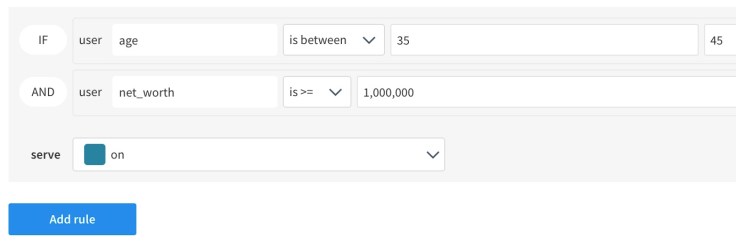
In this example, we’ve created a targeting rule in the Split console that looks for an age group and band of net worth. These parameters are private by nature. In the code sample below, the Split developer provides values for a user as an attributes map.
var attributes = {
  net_worth : 1250000,
  age : 40
}

client.on(client.Event.SDK_READY, function() {
  var treatment = client.getTreatment('cache_or_not_to_cache',
                                   attributes);

  if (treatment === 'on') {
      // insert on code here
  }   else   if (treatment === 'off') {
      // insert off code here
  }   else {
      // insert control code here
  }

});
Our user is forty with a net worth of 1.25M, so he qualifies for the feature. Note that if we had invidually enabled our user to “off” in this feature flag, they would not have received the feature. In Split, the feature flags are evaluated top to bottom.
Caching Attributes
Now let’s suppose we are initializing the mobile or browser interface. At this moment, user data is available. Let’s create our attributes and cache them.
var attributes = {
  net_worth : 1250000,
  age : 40
}

var result = client.setAttributes(attributes);
The setAttributes call can occur any time, and there are other signatures that let you set single key-value pairs. By calling setAttributes, the Split SDK will know to keep these values in cache for subsequent getTreatment calls.
client.on(client.Event.SDK_READY, function() {
  var treatment = client.getTreatment('cache_or_not_to_cache');

  if (treatment === 'on') {
      // insert on code here
  }   else   if (treatment === 'off') {
      // insert off code here
  }   else {
      // insert control code here
  }
});
Note that this code looks the same as the original, key-only example. That’s because the Split SDK is pulling the attributes implicitly from the cache. This gets the same result as explicitly providing the attributes in the previous example, but without having to marshall private data ahead of the evaluation itself.
From a convenience perspective, this is the same as uploading private data to the server to have on hand for evaluation, but with Split all the attributes are kept local and private.
On the Server-side in C#
var values = new List<string> { "read", "write" };
var attributes = new Dictionary<string, object>
{
    { "plan_type", "growth" },
    { "registered_date", System.DateTime.UtcNow },
    { "deal_size", 1000 },
    { "paying_customer", true },
    { "permissions", values }
};
var treatment = sdk.GetTreatment("some_userid","cache_or_not_to_cache", attributes);
The .NET SDK doesn’t offer the same caching functionality because it is assumed that a cache could easily be kept by the Split developer in a server-side context.
Otherwise, the behavior of the SDK is the same. The .NET SDK is eligible to be connected to the Redis cache to give it a performance edge on the clients.
Written with StackEdit.
 To Have and Have Not
Leave a comment